Showing posts with label SEO. Show all posts

Thursday, 12 September 2013

Why your business should be on Google+

Good afternoon, my dear friends, readers and followers! Hi, Mom and Dad, I know you always read me! :)

Today I will share with you some up-to-date piece of knowledge regarding the use of social media channels for business purposes. So, I am sure all of you guys use Facebook and/or Twitter (Vk.com in post Soviet Union countries) as main online communication and connection tool. Obviously, businesses use these SNS for the marketing purposes. For instance, H&M Facebook page with its 16 million Likes can really be named 'encyclopedia example of the social media channels use for retail sector'. On the other hand, Instagram has also proved to be valuable network for fashion brands' online presence. I was always fond of the fashion it-girls like Mira Duma (429k Instagram followers) and how they personalise their businesses (Buro27.ru). Or, as another example, what do you think about Jobs movie promotion campaign? 15 seconds Instagram clips as an alternative to a traditional YouTube trailer looks smart and innovative! (Can you say so about the new iPhone(s)?)

A couple of years ago social media marketing was considered the biggest trend in the industry. I believe it still is important with all the efforts big brands invest into maintaining their SNS pages and even making CRM platforms out of them. One trend I have noticed while in the UK is the emphasise put on Google+ as a No.1 social network for businesses. So, have you heard of Google+?

Google+ is a relatively new SNS launched by Google (obviously) in 2011 and outnumbering Twitter users in just 2 years period! I have been using it for 3 months only, but  can already share with you some hints on why it is important to have your business 'google plused':


1. Search engine optimization  is the biggest concern. On the contrary to websites like YouTube or Facebook, whose content is quite restriced from SEO assessing, Google Plus represents the social network automatically indexed by Google Search. Just like any ther web page, content on the Google+ appears on search, can and does influence your page rank. Moreover, the high ranked information shared on this SNS stays in top search results for years. To compare, your awesomely popular Tweet will be lost in the Net within minutes. Interesting study published by MOZ suggests +1 action on Google+ (smth similar to Facebook`s Like) is 'more highly correlated with search rankings than any other factor. In fact, the correlation of Google +1s beat out other well known metrics including linking root domains, Facebook shares, and even keyword usage'.

2. The new old Authorship. I find my self producing Facebook masterpiece-posts, sharing genious 140 words on Twitter (occasionally) and writing this, hopefully interesting, blog ; clearly, I want the whole world to know who the author is. It is not like we live in the 100%-piracy-copyright infreengement-free world, you know. :) Anyway, Google Plus have introduced this new feature called Google Authorship which works in the following way. First, you should register your email as an author. Secondly, when you share your publications from other web sites (e.g. http://whatiknowishare.blogspot.com) on Google+ do not forget to mention your authorship. As the result, when somebody will google an article written by you, your profile photo from Google Plus will apear next to the search result. 
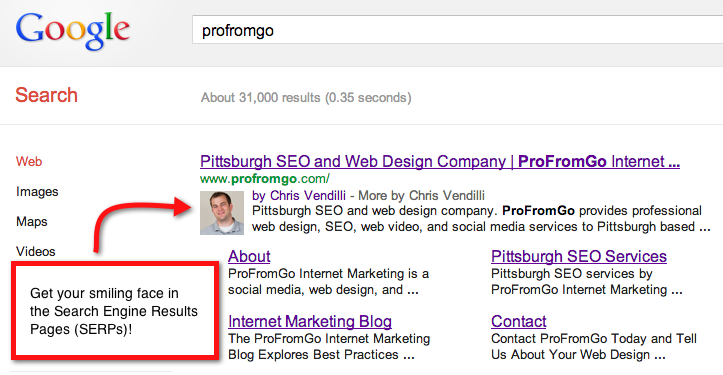

Again, it is important for search optimization, for promoting your content (as in 'more by Fabulous Author') and building personal brand. 

3. Google Timing+ my third favourite feature offered by G+. How do you know when your readers/customers/clients/fans are online? When should you send our your press release, Tweet latest rumors or post picture of the recently launched products? One way to go, is to read this study by Buddy Media naming the end of the week and weekends better time for online engagement. Thus, B2B Twitter  is more efficient on weekdays, whilst on B2C works best for Facebook on the weekends. You can find even more impressive data there, but another way to discovere the right timing is to go on Google+. Timing+ allows for automatic calculation of when your content gets the highest attention through +1 and re-posts. Therefore, you will always be smart in time managing your content. By the way, did you know that the best time for David Beckham to be active on G+ is Thursday between 20:00 and 21:00? Now, you know! 

There are so many more great features Google Plus has to offer, have fun trying out! 

Monday, 12 August 2013

The Art of Blogging

I am back on track and ready to share my new post with you guys.

A friend of mine (thanks for reading me, Simona) asked a couple of days ago if I can write something on how to actually start a blog. I thought this would be a great tip to share, because my blog is only a couple of weeks old, so I can reflect on my recent experience.

The following tips are useful for those who are just about to start a blog and for those who already did and want to improve their blog and make it more professional. Thus, first 2 tips are for beginners and the last 2 - for advanced users.


1. How to start a blog

We are lucky to live in the digital age, because the opportunities it gives us are trully unlimited. It is not like decades ago you had to invest a lot of time and money to start a newspaper and even more to have your own TV channel. On the contrary, social media today represent indibidual platforms for every person to become a news outlet. You want your TV channel - set up YouTube account; you want your own music label (radio station)- create MySpace page; you`ve always dramed on becoming a journalist - start a blog. You want it all together - have your personal website. Here I should probably mention, that I don`t in anyway mean compare or contrast the quality, content or the level of authority of the new and traditional media. Moreover, I don`t call my self a journalist writing this blog. But I do think that evry person can become a medium or at least a thought leader through blogs, websites and SNS.

Does not matter what you need a blog for, there are at least 2 free ways to start one.

Google Blogger (this is the think I am using now)


WordPress  (another free platfrom)


If you ask me which one is better, I don`t really know. I use Blogger and highly recomend it - easy-to-use, works great. Here is a blog post where the person says WordPress is more technologically difficult.

2. How to connect your blog to other social media accounts

As far as SEO is involved, you have better chances for your blog to get indexed if it is connected to the social media accounts. I am going to do it with my blog as well, but am not sure if I should conect it my personal accounts. Anyway, this would be something really useful to learn for the digital age purposes. Thus, if you decide to connect the blog with your personal profiles, make sure you`ve mentione the website`s adress by giving the relevant link!

In order to perform this digital bonding, first of all, you need a basic understanding of HTML. Don`t worry, nothing superficial. You just find social media icons that you want to appear on your page. Later on, you upload them to a photo bank such as Photobucket. This particular website is great, because it lets you copy HTML code for each photo you upload there.

The HTML code for the Twitter icon will look as following:

<a href="http://s1293.photobucket.com/user/Maria_Zhdanova/media/Social-Truck_twi_zpsa5b0aadc.png.html" target="_blank"><img src="http://i1293.photobucket.com/albums/b586/Maria_Zhdanova/Social-Truck_twi_zpsa5b0aadc.png" border="0" alt=" photo Social-Truck_twi_zpsa5b0aadc.png"/></a>

The third step is to copy the link, paste it into some document and than change the first <> weblink into the link to one of your social media accounts.

<https://twitter.com/MariaZhdanova3><img src="http://i1293.photobucket.com/albums/b586/Maria_Zhdanova/Social-Truck_twi_zpsa5b0aadc.png" border="0" alt=" photo Social-Truck_twi_zpsa5b0aadc.png"/></a>

This is how I have connected that Twitter icon to my Twitter account.

The finish up, you have to place this icon on your Blogger page. In order to do this, you have to go to your Blogger settings page. On the left hand side you will find: Overview, Posts, Pages and etc.


What you need is Layout. Click on the Layout and than find Add a Gadget option, this shows you a place where the social media icon will be situated on your blog page.


Click Add a Gadget, and find the one which says 'HTML/Java Script 


Finally, paste the HTML code we`ve created above into the gadget text box. You can also name this Gadget, for example, with 'Follow me on Twitter' headline.

3. How to increase your traffic to your blog

Well, I say - have thousands of friends and big friendly family. This will be your primary audience, anyway. Those people will spread the word and, hopefully, read (or at least) view your blog regularly, improving your stats. 
Secondly, don't forget to share every blog post in every possible SNS. I use Google+, Facebook, Twitter and LinkedIn for this purpose. Interestingly, I have different audiences in all of those networks, therefore, I can reach more people. Even though my Twitter is not as successful as Facebook, but few days ago, my Twitter follower re-twitted info about my blog post, while Facebook people were a bit more passive in this sense. If you ask why does it matter? I will tell you - the more your blog address (web link of http://bla-bla-bla) is mentioned on the Internet, the more it is visible for Google and other search engines.

After you create a blog, you will be concerned about being seen by Google, believe me. If Google don't see your blog - it almost does not exist on the Internet, and this is sad. With my blog, for instance, because it is very young, if you type its name to the Google Search (Tips from the UK, or What I know I share, or anything like that), you won't find it. To check, how many time Google knows about you, copy-paste your URL adress into the Google Search (you will be able to see how many of your friends and relatives do believe in your writing talent ;-)

4. Improve your blog and blogging skills

Read and learn. Here is good short reading list for you:

1. Jim Connolly talking about successful website building, absolutely 'blog applicable' material 
3. Article on how to become a thought leader in your industry, not all about blogging, but still usefull. 

That is it for today! Don't forget to share.

Be happy, my dear readers! 


Wednesday, 7 August 2013

SeoQuake for quick SEO and brand clean up

Hello everyone!

Hope, you are doing great and cannot wait to read my new tip. I did not come back to you for a couple of days, therefore, I decided this time I write something extremely interesting.

This tip will be more marketing, digital, PR focused, as I will talk (write) about SEO.

Few weeks ago I was working on the 'bran clean up', for those who don`t know it is a procedure the company needs to follow after they have changed the name, logo or moved to another location. This always seems quite unprofessional and damage the brand, when it`s already been few years after you changed your logo but media still uses the old one. If you want to change this unfortunate situation you really have to think about 'brand clean up' - create a list of links where your company is mentioned and contact the outlets asking to update the information. Seems like a lot of work, ha? It certainly is, but I will give you some tips how substantially decrease the amount of time you spend on this.

1. You need to search for all the pages that include any info about your company (you can search using the old company's name or a new one if the update you want regards a logo). It probably makes sense to limit the period of search, location and etc. Another way to go, is not update evrything, bit the most influential sources. How do you decide on those?

2. SeoQuake - this is a must have program (plugin) for every marketing/PR/difital professional. In a nutshell, this is great addition to your Google, Firefox or other search engine which helps visualize important data on SEO. On the SeoQuake website you can read the following:

'Beginner web masters and seos will find SeoQuake useful for estimating effectiveness and competitive ability of their SEO efforts. In the hands of professional SeoQuake will become a powerful and indispensable tool for analyzing optimization and promotion level of internet web-projects.'

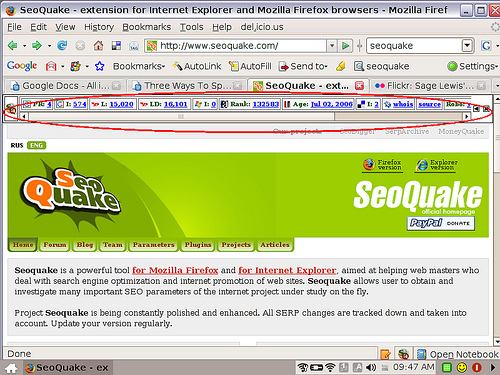
After you install the software on your computer, you will be able to see SEO metrics for every page you open, such as Google page rank, the number of pages that are indexed by Yahoo, Alexa ranking and many others. Overall, it looks like this:


If you would like to read more about how to install this plugin and how to interpret metrics, visit this page. 

3. Back to the brand clean up. :-) so knowing the metrics for the websites, you can choose which ones definitely need updating (the most influential ones) and those who can wait. Moreover, you can optimize the Google search by setting desirable parameters, say, you are looking for the pages with most Facenook likes or something.

4. Another fantastic option SeoQuake gives you, is a possibility to export your search results into the Excel table. Isn't it great? Having everything in one place with opportunity to work with a file without additional copy-pasting. In addition, it is handy because for your clean up, you will probably need to mark all the search results with different colours or notes. For example, you can first mark the pages which are news stories or reports, or case studies. `these are the ones you, probably, won't be able to change. However, you can anyway email the editors with the updates on your new logo, company name and any other data for their future purposes. Secondly, you can mark pages that need update by your HR department, such as job offering websites, LinkedIn page, Yellow pages and etc. Thirdly, I suggest you mark search results which are difficult to interpret (any weird pages). This how I would do it, but the procedure may differ.

Here is a nice article explaining how you can export your SeoQuake results to Excel.

5. Finally, you will need to contact all the websites with the same email requesting the update. This is the stage that takes ages. You see, only when human factor is involved, the process slows down. :) Either than that, with SeoQuake brand clean up is as easy as it's never been.

Hope you like this info. Share and like and read me more .:)