Showing posts with label software. Show all posts

Monday, 2 September 2013

How I became a millionaire blogger with Cision

Morning folks!

For those who thought that I forgot about you and this blog - the answer is no! I am still here, it is just that something so unbelieveable happened to me these days, that I needed a couple of days to realise this was true and so now I am finally ready to share this with you. :)


Before I tell you what it was I have to start from the beginning. Long time ago, in a galaxy far far away...(should probably skip this part)...Maria (this is me in case you do not know) decided to start a blog. This blog. I have mentioned somewhere earlier why I did it and you can say I lack belief and confidence or whatever, but I have never expected it to become this successful, not at least within 3 weeks!
With blogs I thought it takes a while for Google to index you, for Internet crawlers to notice you and for readers to start loving what you write. And it certainly does, but with me it all happened so quickly that I am still pleasantly shocked. :) 

Here is what happened step-by-step.


1. Remember, my piece on Cision - huge media contacts' database and the best tool for every PR  person?  I wrote that post because I trully believed in the usefulness of this software and was absolutely amazed with what it offered. What happened within 3 days is that I started noticing unexpected amount of traffic coming to my blog. 'Woo-hoo! I blog like a pro' - that's the kind of though I had immediately. :) Not to say that I don't, but the fact is that Cision did make me a millioner, in digital sense. 


2. It turned out that the company has recently introduced new software, called Content Marketing, and I was lucky enough to experience all the benefits of it for free.

[Just so you know, content marketing really is a big deal these days! According to one of the latest Econsultancy report, this is a key priority and, probably, the most significant digital trend for the following year. Thus, content marketing is a new king.]

So, what Cision has to offer in this context? Apparently, it it something even bigger than having all the media contacts in one place and send personalised press releases with one click. Again, the above mentioned Econsultancy not only names content marketing to be something all the marketers should keep their eye on, but distinguishes 'newsjacking' as a seperate valuable content marketing tool. Newsjacking means 'injecting your ideas or angles into breaking news, in real-time, in order to generate media coverage for yourself or your business' (Scott, 2011). What Cision Content Marketing software does, it uses the term in a very straightforward way. 


3. It literarly makes your news stories, press releases, blog posts appear in more than 60,000 key publishing websites (all over the world)Yes, we are talking The Times, CNN, Daily Mail and everything else you think is TOP. This is what happened to my blog post!!! Impressive, ha? Moreover, it really is different from simple advertising or paid content, because it does not look like a banner or cheap 'click on me' kind of thing. The stories look like part of the website content in a form of 'suggested news' or 'more related stories'. 

4. What have all of this given me? Could I imagine being on Daily Mail or Mashable? No way, not at this point of my blogging life. I can go on about how I am deeply greatful to Cision for noticing my blog and how impressed I am with their new service, but let`s be more professional here. People who know staff about digital, marketing and PR should be able to see if the new Cision software works from the report I attach below.


I told you I was a millionaire! :)

For those who do not know:

Impressions: How many people/businesses have chosen to engage and go onto the page.
Clicks: How many people have clicked onto the article

These are the sources that gave me traffic:


And finally, my weekly statistics (sociologists in me feels extremely happy about this):

As you can see, during the week with Cision Content Marketing I did not have less than 200.000 impressions daily. 

Some concluding thoughts:


1. Yes, I am lucky.
2. Yes, I did earn my first million with Cision.
3. Again, I do not want to talk about the price, because I am not selling anything here but sharing the fantastic experience I had. I believe you can check the details and request other useful information here. The only thing I want to add in the end is that I see so many ways this new software can help PR practitioners. First of all, it is seems like an interesting facilitation for different campaigns, because it does give more distribution and raise awareness. On the other hand, (I do not really wish this to happen to anyone, but) imagine you have a disastrous campaign, your press releases just did not make it, no one wants to publish the story. No, it is not because you are bad, say, the client is weird and wants to make news form a story that has been already revelead years ago. Well, I can think of different reasons for the campaign to not be successful, and I am sure you can too. The fact is you should show the client what you have done, no matter what. I think that is a great solution to use your own blog or website to feature the story and than distribute it through Content Marketing to all the top news services. This is the 100% traffic-attraction effective tool.  

Fuh, I feel so relieved, like I could not  keep this information without sharing anymore! ;) So glad I did it! 

I do hope you find this useful.

Sincerely yours,

M


Wednesday, 7 August 2013

SeoQuake for quick SEO and brand clean up

Hello everyone!

Hope, you are doing great and cannot wait to read my new tip. I did not come back to you for a couple of days, therefore, I decided this time I write something extremely interesting.

This tip will be more marketing, digital, PR focused, as I will talk (write) about SEO.

Few weeks ago I was working on the 'bran clean up', for those who don`t know it is a procedure the company needs to follow after they have changed the name, logo or moved to another location. This always seems quite unprofessional and damage the brand, when it`s already been few years after you changed your logo but media still uses the old one. If you want to change this unfortunate situation you really have to think about 'brand clean up' - create a list of links where your company is mentioned and contact the outlets asking to update the information. Seems like a lot of work, ha? It certainly is, but I will give you some tips how substantially decrease the amount of time you spend on this.

1. You need to search for all the pages that include any info about your company (you can search using the old company's name or a new one if the update you want regards a logo). It probably makes sense to limit the period of search, location and etc. Another way to go, is not update evrything, bit the most influential sources. How do you decide on those?

2. SeoQuake - this is a must have program (plugin) for every marketing/PR/difital professional. In a nutshell, this is great addition to your Google, Firefox or other search engine which helps visualize important data on SEO. On the SeoQuake website you can read the following:

'Beginner web masters and seos will find SeoQuake useful for estimating effectiveness and competitive ability of their SEO efforts. In the hands of professional SeoQuake will become a powerful and indispensable tool for analyzing optimization and promotion level of internet web-projects.'

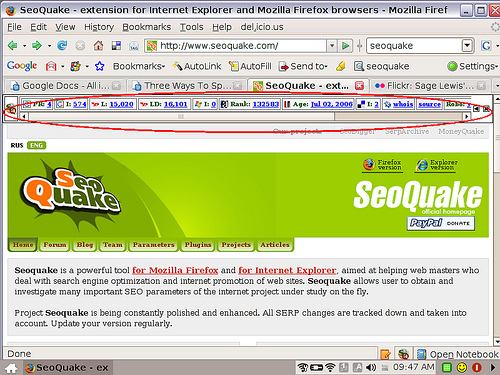
After you install the software on your computer, you will be able to see SEO metrics for every page you open, such as Google page rank, the number of pages that are indexed by Yahoo, Alexa ranking and many others. Overall, it looks like this:


If you would like to read more about how to install this plugin and how to interpret metrics, visit this page. 

3. Back to the brand clean up. :-) so knowing the metrics for the websites, you can choose which ones definitely need updating (the most influential ones) and those who can wait. Moreover, you can optimize the Google search by setting desirable parameters, say, you are looking for the pages with most Facenook likes or something.

4. Another fantastic option SeoQuake gives you, is a possibility to export your search results into the Excel table. Isn't it great? Having everything in one place with opportunity to work with a file without additional copy-pasting. In addition, it is handy because for your clean up, you will probably need to mark all the search results with different colours or notes. For example, you can first mark the pages which are news stories or reports, or case studies. `these are the ones you, probably, won't be able to change. However, you can anyway email the editors with the updates on your new logo, company name and any other data for their future purposes. Secondly, you can mark pages that need update by your HR department, such as job offering websites, LinkedIn page, Yellow pages and etc. Thirdly, I suggest you mark search results which are difficult to interpret (any weird pages). This how I would do it, but the procedure may differ.

Here is a nice article explaining how you can export your SeoQuake results to Excel.

5. Finally, you will need to contact all the websites with the same email requesting the update. This is the stage that takes ages. You see, only when human factor is involved, the process slows down. :) Either than that, with SeoQuake brand clean up is as easy as it's never been.

Hope you like this info. Share and like and read me more .:)
            

Monday, 5 August 2013

Remember to send your work to cloud: useful tips on keeping your files safe

Nighty night to everyone!

Today or tonight's post will be about the cloud or in modern meaning the Internet storage softwares.

I came across the cloud storage in the beginning of my internship. I realized that the company saved all of the work online without having hundreds of files on their desktops. Unfortunately, I did not payed enough attention to this and later on this almost cost me a dissertation. Thus, after I spilled water over my laptop and could not access any data on it, I started thinking about alternative ways of keeping my work safe. Of course, you can back up your stuff and use USB storage, but it might be worth thinking of some up-to-date options.

Just to give you one reason the following info is useful, think of the situation when you are in the university, at the important meeting or with the business client and suddenly realize you forgot to bring some important documents. If you use cloud services this will never happen, because you can access your stuff from any other computer.

So, let me share with you what I know:

1. Googe Drive

This file storage and synchronization service was introduced by Google just in 2012. But I certainly think it has already found its fans and the number is 'a hell of a lot' (couldn't wait to use this expression). So if you have Gmail account, you can immediately start benefiting from the virtual storage space this virtual Drive offers you. Not only now I save my documents there, I very often work thefe creating presentations, charts and folders. Therefore, Google Drive is wonderful facilitation to companies' Intranet, because in Google Drive not only the documents can be stored, but the whole company can together work on every file. You can share your work with colleagues, edit their work and assign tasks and there is no need for 'email-attach-download-save as' routine. Easy peasy lemon squeezy!


2. DropBox


Another online storage service very easy to use and very important to have. Similarly to Google Drive, it lets you save your work and share it with colleagues and friends. As far as I know, you can create the documents in DropBox and upload the existing ones from your computer. The great advantage of this service is the possibility of storing large size and amounts of data, such as photos. This is extremely handy when you want you pictures safe in one place and accessible for family members. In regards to the professional sphere, this is a necessity for designers, illustrators and guys who work with .jpg, .png and etc. To sum up, DropBox is something like 'free hard drive'.


Anyway, I would suggest using both services, because they complement each other, really.

Hope this helps.
:-)


Saturday, 3 August 2013

How to spend less time on SNS and never miss anything important

Hi guys!!;)

I know it is already Sunday in the UK, but I did not want to live you without any tips, so here we go. Don't forget to come back for more tomorrow.:) 

Do you use any social networking sites? Well, I am sure you do. I am registered in almost every possible SNS, therefore, find it quite challenging to keep all of the accounts up-to-date and follow all the news. Luckily, Web 2.0 has created solution for this problem, even two. 

If you are a smartphone owner and want to have all www news in one place, there are 2 great applications you need to download: 

1. Prismatic - this app (as both for Apple and web) is something close to a digital newspaper, or a platform integrating content from social media, such as Twitter, Facebook, Google Reader, and every news outlet you read. You can then filter the news according to your topics of interest, location or other parameters. Simple design and nice interface.


2. Flipboard - your social media news magazine for iOS and Android. As for me this one is much more fun comparing to Prismatic. Overall, it depends on what you prefer - a magazine (with all the colourful  glance) or a newspaper (strict classy b&w). Flipboard allows you to browse all content from your social media accounts and from all over the web based on your interests. By choosing to read about food, marketing or fashion (or about everything at once) you can create unique, absolutely personalized magazine! It is extremely simple, bright and handy when you don't want to spend hours checking all the SNS you are registered with.


Have fun exploring!

Good night or good morning.:) 

Friday, 2 August 2013

Cision: Media Relations from the new vision

Sunny hello to everyone!

Today`s information may look like some kind of advertising, but it is not, even though I do recommend this software to every PR professional.

The very first day of my internship I was introduced to the best friend of every PR person - Cisionpoint by Cision.


I don`t know if you ever had 'Excel based map' experience (when you have to create and update, and rearrange the lists of media contacts important for your work), but I know this was terrible and inconvinient.
Not only we had to almost be friends with journalists to get their contacts or spend the whole week Googleing and searching for the email address so secret it was never displayed on the newspapers website, but the data needed quite a regular update with the same procedures.

Apparently in the UK (and the US) things are so much easier, you just subscribe for the Cisionpoint software and half of the work is already done for you.

Details

What is it? - Imagine your Excel list of media contacts in the global scale. Yes, this software has all (or almost all) media contacts, including the personal contacts of journalists, freelancers, bloggers and even Twitter though leaders necessary for successful campaign. Of course, the most fully completed database, I believe, is for UK and American media outlets. However, I checked, all the most influential Russian, Ukrainian, Polish and Turkish contacts are there.


What can I do with it? - You can create projects and make media contact`s lists for every of them, handpicking the right journalists. The search options even let you find people who write about 'fish tourism from radical perspective' (but why would you want to look for them?). More seriously, the profiles of the newspapers, magazines and webistes include information about the audience, editors, areas of interests, influentiality and etc.
In addition, you can write and send press releases through this software to the early chosen contacts, making the emails as personalised as possible just in a few clicks! (I was really impressed with this). Later on, you will receive the monitoring of your coverage on a daily basis and analyse the results of your work. You can also add your own contacts and edit existing ones.


Why would I need it? - I really have no ideas about the monthly price the company should pay for using this software, but I believe it is worth it. (Information on the prices should be available here). Cisionpoint substantially help PR professionals in their daily routine, is quite simple and easy-to-use.

Here are some YouTube videos I found to show Cisionpoint in work:

1. Search tutorial 
2. Coverage monitoring notifications tutorial 


And finally, on cision blog I found this article interesting, so I share it with you - 

7 PR Pitches That Will Get My Attention Every Time


Hope this is useful. :)

Best wishes!